
Best for a person or registered endpoint. Choose the SIP domain and user.
USER MANUAL · API v1.0
Build your voice network with SIPGPT.
Practical guides for phone numbers, SIP users, trunks, inbound routing, outbound termination, PBX integrations, security, and automation.
1Number or PBXOriginates traffic
2SIPGPTAuthenticates and routes
3User, trunk or appAnswers the call
01
Know the building blocks
These terms appear throughout the dashboard and API.
- DID / phone number
- A public number callers dial. Route it to a SIP user, trunk, IVR, voicemail, AI agent, or external destination.
- SIP domain
- The registration namespace for your SIP users, such as
company.sip.sipgpt.co. - SIP user
- A credentialed endpoint used by a softphone, desk phone, application, or contact center agent.
- SIP trunk
- A connection between SIPGPT and a PBX, carrier, SBC, or voice application, authenticated by IP or credentials.
- Origination
- Inbound traffic delivered from a phone number or another carrier into SIPGPT.
- Termination
- Outbound traffic sent from your SIP system through SIPGPT to the telephone network.
- ANI
- The calling number (caller ID). SIP commonly carries it in
FromandP-Asserted-Identity. - DNIS
- The called number. SIP commonly carries it in the Request-URI and
Toheader.
02
Receive your first call
The shortest path from a new account to a ringing SIP client.
- Create a SIP domain
Open Configure → SIP Domain, choose a unique domain name, and use password authentication.
- Create a SIP user
Open Configure → SIP User, select the domain, create a username, and copy the generated password once.
- Register a SIP client
Enter the domain, username, password, port, and transport in your client. Confirm the user shows as registered.
- Buy and route a DID
Purchase a number, select SIP user as its voice destination, and choose the user you created.
- Test from the PSTN
Call the DID from another telephone. If it does not ring, use the call log and troubleshooting checklist below.
03
Buy phone numbers
Search inventory, review requirements and charges, then assign call handling.
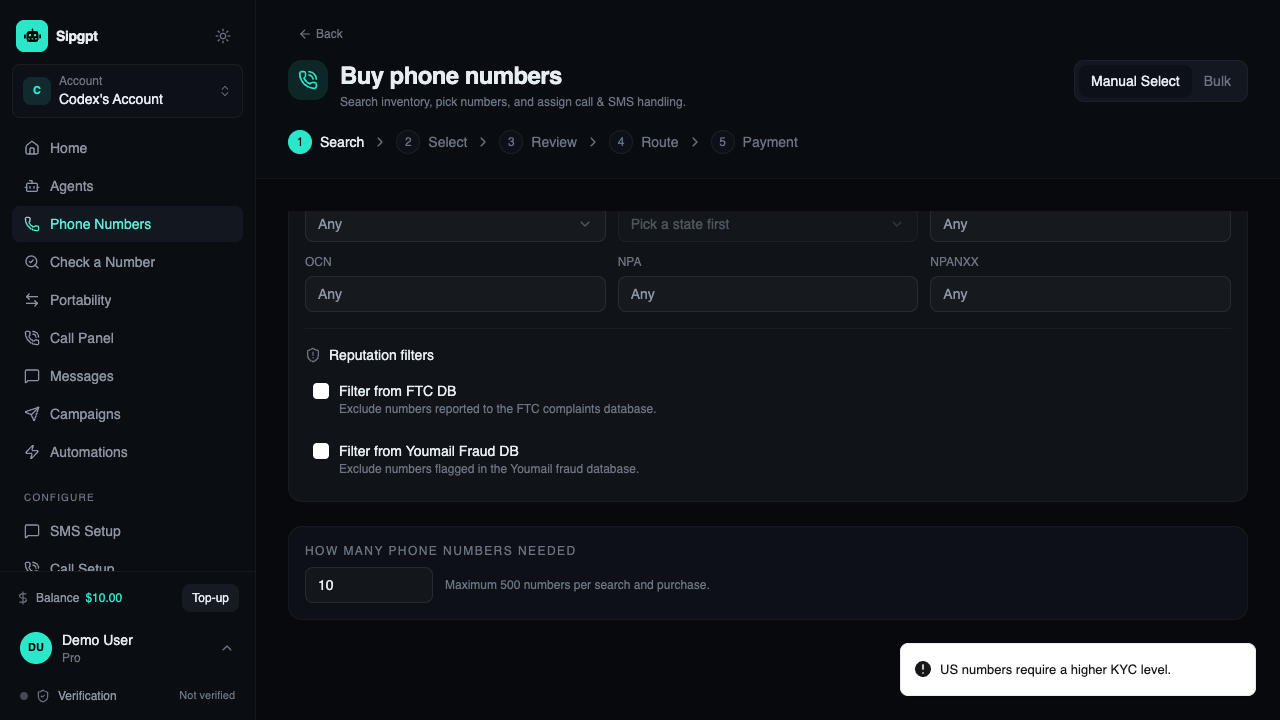
- Open Phone Numbers → Buy numbers.
- Select country and number type, then narrow by state, rate center, NPA or prefix.
- Choose the quantity and search. Some countries require an approved identity or address bundle.
- Select numbers and review setup fees, monthly charges, voice rates and messaging capability.
- Choose the initial route and payment method, then confirm the purchase.
Purchases can create recurring charges. The confirmation screen is the authoritative price summary.
04
Route a purchased number
One DID can have one active primary route plus supported fallback behavior.
Best for a PBX, SBC or external voice application. Choose the destination trunk.
Play a greeting, record the caller, and optionally deliver the message by email.
Play a menu and route keypad choices to users, trunks, queues or external numbers.
Connect the call to a configured conversational agent when enabled for the account.
Forward to the PSTN. Outbound usage charges and caller-ID rules apply.
Change an existing route
- Open Phone Numbers and select the DID.
- Choose Voice routing, select the target type, then select or enter the destination.
- Configure no-answer or unavailable failover if offered.
- Save, place a test call, and confirm the selected route in Call Logs.
05
Send an external DID to SIPGPT
Keep the number with another provider and deliver its SIP traffic to your SIPGPT ingress.
- Create an inbound trunk
Choose IP authentication when your provider publishes stable signaling IPs; otherwise use the supported credential method.
- Allow the provider
Add every documented signaling IP or CIDR. Never allow the entire internet unless the trunk has another strong authentication layer.
- Configure the provider
Set its primary and backup destinations to the SIPGPT ingress host and port shown on the trunk. Use the agreed UDP, TCP, or TLS transport.
- Normalize the DID
Send the called number in E.164 format in the Request-URI unless the route explicitly expects another format.
- Verify signaling and media
Confirm ANI, DNIS,
P-Asserted-Identity, codecs, DTMF, and RTP source addresses in the call log.
06
Create SIP domains and users
Domains group registration identities and their inbound routing policy.
Create a domain
- Open Configure → SIP Domain.
- Choose an available name.
- Select password or IP authentication.
- Select the default routing target.
- Save and copy the displayed SIP hostname.
Create a user
- Open Configure → SIP User.
- Select the domain.
- Create a unique username and display name.
- Generate or enter a strong password.
- Copy the secret and test registration.
07
Connect a SIP client
The labels vary by client, but the values map consistently.
| Client field | SIPGPT value | Notes |
|---|---|---|
| Account / user | SIP username | Do not use the dashboard email. |
| Authorization user | SIP username | Usually identical to the account field. |
| Password | SIP user password | Reset it if the original was not saved. |
| Domain / registrar | SIP domain hostname | Do not include https://. |
| Outbound proxy | Value shown by SIPGPT | Leave blank unless the domain page specifies one. |
| Transport | UDP, TCP or TLS | Port must match the chosen transport. |
| Media | RTP or SRTP | Use SRTP with TLS when supported end-to-end. |
| DTMF | RFC 4733 / telephone-event | Required for most IVR menus. |
Applies to Zoiper, Linphone, MicroSIP, Bria, Groundwire, Grandstream, Yealink and other standards-based clients.
08
Connect a PBX or SIP switch
Use a trunk for FreeSWITCH, Asterisk, OpenSIPS, Kamailio, FreePBX, 3CX, FusionPBX and SBCs.
<gateway name="sipgpt">
  <param name="proxy" value="YOUR_SIPGPT_HOST"/>
  <param name="username" value="YOUR_TRUNK_USER"/>
  <param name="password" value="YOUR_TRUNK_PASSWORD"/>
  <param name="register" value="true"/>
</gateway>
[sipgpt]
type=endpoint
transport=transport-tls
context=from-sipgpt
disallow=all
allow=ulaw,alaw
outbound_auth=sipgpt-auth
aors=sipgpt-aor# Route E.164 destinations to SIPGPT
if ($rU =~ "^\\+[1-9][0-9]{7,14}$") {
$du = "sip:YOUR_SIPGPT_HOST:5061;transport=tls";
route(RELAY);
}Provider: Generic SIP Trunk
Registrar / Server: YOUR_SIPGPT_HOST
Authentication: IP or credentials shown by SIPGPT
Main trunk number: Your approved caller ID
Number format: E.16409
Route traffic to your own SIP trunk
Send inbound calls from SIPGPT to your PBX, SBC, carrier, or application.
- Create a trunk and select Bring your own.
- Enter a resolvable SIP URI or hostname, port, transport, and authentication.
- Add a primary destination and, where supported, backup destinations in priority order.
- Choose codecs, DTMF, number format, and header behavior.
- Assign a DID, domain route, IVR option, or routing rule to the trunk.
- Send SIP OPTIONS, place test calls, and verify failover before production.
10
Use SIPGPT for outbound termination
Send calls from your trusted switch to the telephone network.
- Create a termination route
Choose credential or source-IP authentication and add only the IPs that will originate traffic.
- Set guardrails
Allow required countries only; configure calls per second, channels, spending limits and fraud alerts.
- Configure your switch
Send E.164 destinations to the assigned SIPGPT termination hostname using the displayed transport and port.
- Set an authorized caller ID
Use a number you control. The ability to sign the call depends on verification and STIR/SHAKEN configuration.
- Validate billing and quality
Compare call logs, duration, rate and charge; test failure responses and backup routes.
11
IVR and voicemail
Build a caller journey for business hours, menu choices and unanswered calls.
DID→Business-hours rule→IVR→User / trunk / queue→Voicemail fallback
- Upload or record a concise greeting.
- Configure timeout, invalid input, repeat and operator options.
- Use RFC 4733 DTMF on SIP legs.
- Route each menu option and define a no-answer timeout.
- Configure voicemail notification and message retention.
- Test every path from an external phone.
12
Routing and number rewriting
Match calls, normalize identities, select destinations and define failure behavior.
| Match | Typical action |
|---|---|
| DNIS equals or begins with | Route, block, or strip/add a destination prefix. |
| ANI equals or begins with | Allow, block, select a route, or apply caller treatment. |
| Time and holiday | Send to an IVR, on-call destination, or voicemail. |
| Trunk or source IP | Apply the correct normalization and outbound policy. |
| SIP response or timeout | Fail over to the next destination or voicemail. |
Normalize numbers to E.164 at the network edge. Change From, P-Asserted-Identity, Diversion, or privacy headers only when your trust and compliance policy permits it.
13
STIR/SHAKEN
Sign eligible US calls with an authorized identity and verify signed inbound calls.
- Complete the account and business verification required for calling.
- Add and verify every caller ID you intend to originate.
- Choose SipGPT-managed signing or configure your supported signing integration.
- Where bring-your-own certificates are supported, upload the certificate chain securely and protect the private key.
- Select the attestation policy permitted for the customer and number relationship.
- Place test calls and inspect Identity/verification results in call logs.
14
Blocking and fraud controls
Use layered controls; do not rely on one rule.
- Block or allow exact ANI/DNIS values and prefixes.
- Restrict high-risk countries and premium destinations.
- Allowlist trusted source IPs for every IP-authenticated trunk.
- Set per-account and per-trunk CPS, channel and spend limits.
- Block anonymous or malformed traffic when the service does not require it.
- Alert on registration spikes, unusual destinations and rapid spend.
- Keep an emergency procedure to suspend a user, trunk or route.
15
Network and media readiness
Use the live trunk/domain page as the source for current IP ranges and ports.
Signaling
- Allow documented SIPGPT signaling IPs only.
- Match UDP/TCP/TLS port and transport.
- Disable problematic SIP ALG behavior.
- Use DNS rather than pinning undocumented IPs.
- Monitor with SIP OPTIONS where supported.
Media
- Allow the documented RTP range bidirectionally.
- Advertise reachable public or correctly translated addresses.
- Use a mutually supported codec.
- Use RFC 4733 DTMF.
- Prefer TLS with SRTP for encrypted deployments.
16
Troubleshooting calls
Start with the call ID, SIP response and the last successful network hop.
| Symptom | Check first |
|---|---|
| Registration returns 401 repeatedly | Domain, authorization username, password and system clock. |
| 403 Forbidden | Source-IP allowlist, account status, caller ID and destination permissions. |
| 404 / no route | E.164 DNIS, selected account, DID assignment and active route. |
| 408 / timeout | DNS, firewall, transport, destination reachability and OPTIONS status. |
| 480 / 486 | User registration, device state, call limits and no-answer failover. |
| 503 | Capacity, upstream availability, trunk status and backup route. |
| One-way or no audio | NAT, RTP IP/port allowlist, SDP addresses, codec and SRTP agreement. |
| Call drops near 30 seconds | Missing ACK caused by NAT, Record-Route or Contact reachability. |
17
SIPGPT MCP overview
Give an AI client controlled access to SIPGPT tools without sharing telecom credentials.
Model Context Protocol (MCP) lets supported assistants discover and call SIPGPT tools on your behalf. External clients such as Codex, Claude, Cursor, and VS Code connect to the hosted Streamable HTTP endpoint. The built-in SIPGPT chat uses the same account-scoped tool layer through the dashboard API; the browser never calls /mcp directly.
External AI client
Connects to https://api.sipgpt.co/mcp, presents a short-lived authorization, and receives only the tools allowed by its scopes and your SIPGPT role.
Built-in SIPGPT
Runs inside app.sipgpt.co using authenticated /api/v1/sipgpt/* endpoints. It works independently of the hosted MCP connection.
18
Connect your AI agent
Create a least-privilege connection from the authenticated dashboard.
- Open your profile menu, choose MCP, then open AI Integrations.
- Select Codex, Claude, Cursor, VS Code, or Other.
- Review the requested scopes. Start with read-only access and add write access only when required.
- Choose Connect for an OAuth-capable client, or Copy config for manual setup.
- Complete the client authorization and run Test connection.
- Return to the MCP page to review activity, change access, or revoke the connection.
Manual client configuration
{
  "mcpServers": {
    "sipgpt": {
      "url": "https://api.sipgpt.co/mcp",
      "headers": {
        "Authorization": "Bearer YOUR_ONE_TIME_TOKEN"
      }
    }
  }
}Available scopes
| Scope | Default | Access |
|---|---|---|
numbers:read | On | Search and view phone numbers. |
sip:read | On | View SIP trunks, users, and routing. |
numbers:purchase | Off | Prepare purchases; every purchase requires confirmation. |
routing:write | Off | Prepare routing changes; every change requires confirmation. |
cdr:read | Off | Read sensitive call-detail records. |
Scopes can only reduce access. Your account role and underlying SIPGPT permissions are always enforced as well.
19
Tools and confirmations
Read tools can return data immediately; changes use a prepare-and-confirm workflow.
Read tools
search_numberslist_owned_numbersget_numberlist_sip_trunkslist_sip_usersget_number_routelist_agentsget_account_balance
Prepare tools
prepare_number_orderprepare_create_sip_trunkprepare_assign_number_route
Agent and campaign workflows may be returned as drafts; campaigns are not launched automatically.
- The agent calls a prepare tool.
- SIPGPT validates account access, pricing, inventory, and requested changes.
- SIPGPT creates a server-owned pending action and shows an exact summary.
- You explicitly confirm or cancel it.
- Only the dedicated confirmation endpoint may execute the mutation.
20
Built-in SIPGPT chat
Operate SIPGPT from the dashboard with resumable sessions and safe action previews.
Use the six quick actions—Buy Phone Number, Bulk Buy Numbers, Build Agent to Answer Calls, Voice Campaign, Ringless Campaign, and Build AI SMS Campaign—or describe the task in the composer. SIPGPT can return number candidates, clarification forms, versioned artifacts, and confirm/cancel cards.
Sessions are scoped to the signed-in account and user. The UI resumes event polling with a cursor, suppresses duplicate runs using clientMessageId, and shows retry state if a request is interrupted. Purchase and routing operations still require explicit confirmation.
MCP troubleshooting
| Symptom | Check |
|---|---|
| 401 Unauthorized | The connection secret may be invalid, expired, or revoked. Reconnect from the dashboard. |
| 403 Forbidden | Check both the MCP scope and your SIPGPT account role/permission. |
| A tool is missing | Confirm the required scope is enabled, then reconnect or refresh tools in the AI client. |
| Pending action expired | Ask the agent to prepare the action again so prices, inventory, and routing state are revalidated. |
| Endpoint unavailable | Check the connection state on the MCP page. Your account may not yet have hosted MCP enabled. |
21
Production security checklist
Review before carrying live traffic.
- Unique SIP and API credentials
- Source-IP allowlists
- TLS/SRTP where supported
- Country and destination restrictions
- CPS, channel and spend limits
- Verified outbound caller IDs
- Primary and backup routes tested
- Webhook signatures verified
- Secrets excluded from client code and logs
- Credential rotation and incident owner defined
- Recording consent requirements reviewed
- Emergency calling limitations understood
An MCP session ID is not authentication. SIPGPT derives user and account identity from verified authorization, never from an untrusted x-user-id header. Connection secrets are shown once and stored only as hashes.
22
Interactive API reference
Authorize with a bearer token, inspect schemas, and test documented user-facing operations.
No matching topic
Try a broader term such as “trunk”, “number”, “routing”, “PBX”, or “API”.